Guide
Turn PDF into Audiobook - AI narrated guide

You can easily turn a PDF into an audiobook. The process is straightforward: use Text-to-Speech (TTS) software to convert the written text into audio files. This involves cleaning up your PDF's text to create a script, picking an AI voice that fits your brand, and using a platform to generate the audio. From there, you can edit and package it for distribution.
Why Creating an Audiobook From a PDF Is a Game Changer
Transforming your existing PDFs—like ebooks, reports, or guides—into audiobooks is way more than just recycling old content. It’s a strategic move to tap into a booming market, connect with a modern audience, and create valuable new assets for your business.
If you’re a creator with a library of written material, this is a powerful new channel for engagement and revenue just waiting to be unlocked.
The shift from text to audio is undeniable. Over the last decade, turning PDFs into audiobooks has gone from a niche experiment to a mainstream growth engine. The global audiobook market has already soared past $2.2 billion in revenue, making it one of the fastest-growing segments in publishing.
This trend is all about consumer habits. One survey found that 64% of US book consumers have listened to at least one audiobook. Younger audiences, in particular, love audio for its multitasking convenience. You can dig into more of these consumer trends over at Narration Box.
Unlocking New Opportunities
Converting a static PDF gives you several key advantages that written content just can't offer. It lets you meet your audience where they are—during their commute, at the gym, or while doing chores. This accessibility dramatically increases the odds that your content will be consumed from start to finish.
Here are the core benefits you can expect:
Expanded Audience Reach: You instantly connect with people who prefer listening over reading. This includes those with visual impairments or learning differences like dyslexia.
Higher Engagement Rates: Listeners often form a more personal connection with content they hear, leading to better brand recall and loyalty. An audiobook feels more like a conversation than a document.
New Revenue Streams: An audiobook is a premium product. You can sell it on platforms like Audible, bundle it with an ebook for a higher price, or offer it as part of a paid membership.
By not offering an audio version of your key content, you're potentially ignoring a huge segment of your market that is ready and willing to pay for the convenience of listening.
Ultimately, the decision to turn a PDF into an audiobook is about maximizing the value of your work. It transforms a one-dimensional document into a multifaceted asset that can serve as a lead magnet, a premium product, or a tool for building deeper customer relationships.
Prepping Your PDF for a Flawless Audio Conversion
Jumping straight from a PDF to an audio file is a recipe for a clunky, disjointed listening experience. Before you even think about generating a voice, the single most important step is preparing your text.
This prep work is the secret to turning a static document into a polished audiobook that sounds intentional and professional, not like a robot reading a user manual.
Your goal is to create a clean, narration-ready script. A raw PDF is filled with elements that make sense visually but sound jarring when read aloud. Think about headers, footers, page numbers, and image captions—these need to be stripped out completely to ensure a smooth flow.
Extracting and Cleaning Your Text
First, you need to get the text out of the PDF and into an editable format, like a Google Doc or a simple text file. If your PDF has selectable text, you can often just copy and paste it. Be warned, though: this method can introduce strange line breaks and spacing issues that you'll have to fix manually.
For scanned or image-based PDFs, you'll need an Optical Character Recognition (OCR) tool. Many free online services can handle this, converting the images of text into actual, editable words. This process isn't always perfect, so a careful proofread is essential to catch any conversion errors.
If you're stuck working with a file you can't edit, our guide on how to modify a read-only-pdf offers some helpful workarounds.
Key Takeaway: A clean script is non-negotiable. Every minute spent removing visual artifacts and fixing formatting will save you hours of frustration and re-recording later. This initial cleanup directly impacts the final audio quality.
Once your text is extracted, the real work begins. Read through the entire script, specifically listening for anything that doesn't belong in a spoken narrative.
This infographic shows exactly how a well-prepared audiobook can directly connect to increased revenue, higher listener engagement, and audience growth.
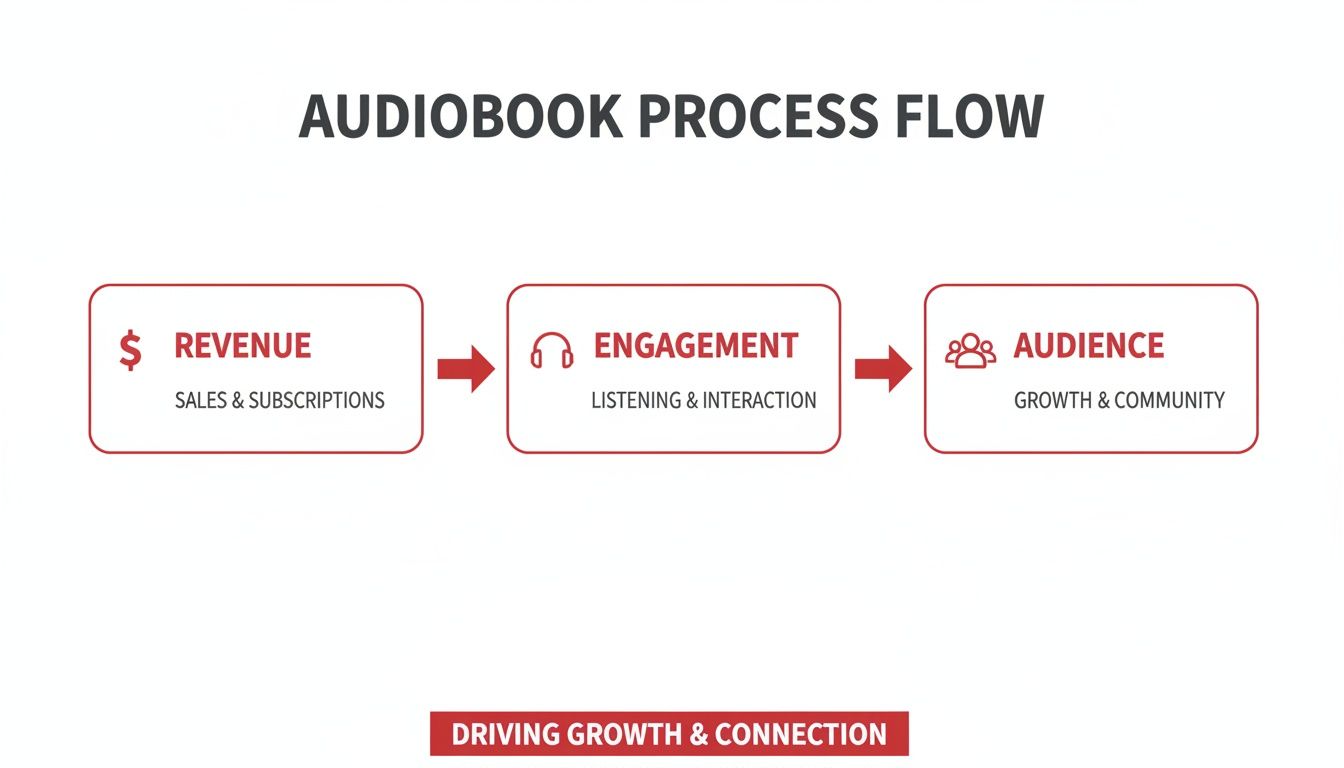
The flow shows a clear path from creating a quality audio product to achieving tangible business results, emphasizing why good preparation is so valuable.
Before you send your text to the AI narrator, run through this checklist. It’s a simple process that catches the most common issues that trip up text-to-speech engines and ruin the listening experience.
PDF Cleanup Checklist for Audio Narration
Checklist Item | Why It Matters for Audio Quality | Quick Tip |
|---|---|---|
Remove Headers & Footers | Prevents the AI from repeatedly reading page numbers or document titles at unnatural intervals. | Use your editor's "Find and Replace" function to delete recurring text in bulk. |
Delete Image Captions | Captions like "Figure 1.1" sound clunky and break the narrative flow. The context is lost without the image. | Delete them entirely or rewrite the core idea into the main text if it's critical information. |
Fix Line Breaks | Awkward line breaks from copy-pasting can make the AI pause in the middle of a sentence, sounding robotic. | Most text editors have a feature to remove extra line breaks automatically. |
Check URLs & Links | AI narrators will try to read out long, complex URLs character by character, which is unlistenable. | Remove the URL entirely, or rewrite it as, "You can find more details on our website." |
Simplify Punctuation | Excessive use of things like asterisks, ampersands (&), or multiple exclamation points can confuse the AI. | Replace symbols with their word equivalents (e.g., change "&" to "and"). |
Spell Out Acronyms | The AI might mispronounce an acronym or read it as a word. For example, it might say "aw-sum" instead of "A-W-S-O-M-E." | The first time an acronym appears, write it out in full, followed by the acronym in parentheses. |
Going through these steps ensures the text you feed the AI is as clean as possible, which is the foundation of a high-quality audiobook.
Adapting Visuals for an Audio Format
The next challenge is translating visual elements for a listening audience. Your original PDF likely contains charts, graphs, tables, or bullet points that just don't translate directly to audio. You have to rewrite them.
Charts and Graphs: Don't just say, "Here is a chart showing sales growth." Instead, describe the key takeaway. For example, rewrite it as: "The data shows a significant sales increase of over 35% in the third quarter, driven primarily by our new product launch."
Bulleted Lists: A narrator reading a bulleted list can sound stiff and robotic. Convert the points into a more natural, conversational sentence. Instead of a list of features, you might say, "The system includes key benefits such as automated reporting, seamless team integration, and 24/7 customer support."
Tables: Complex tables are impossible to narrate effectively. Isolate the most critical data points and present them as clear, concise statements. Focus on the conclusion the table is meant to support.
This isn't just about deleting content; it's about translating it. By thoughtfully adapting these visual elements, you ensure the listener receives the same information and context that a reader would. This meticulous preparation is what separates a basic text-to-speech output from a truly professional audiobook.
Choosing and Directing Your AI Voice Actor
With a clean script in hand, we get to the fun part: casting your narrator. The latest Text-to-Speech (TTS) platforms offer an incredible lineup of AI voices, a world away from the monotone robots of the past. Your choice here will define the entire personality of your audiobook.
Don’t think of the AI voice as just a piece of software. Treat it like a voice actor you need to cast and direct. Get it right, and you build trust that keeps listeners hooked. Get it wrong, and even the best content can fall completely flat.
Finding the Right Voice for Your Brand
The AI voice market is packed with powerful options, from big tech companies to specialized startups. Each platform gives you a library of voices with distinct accents, tones, and styles.
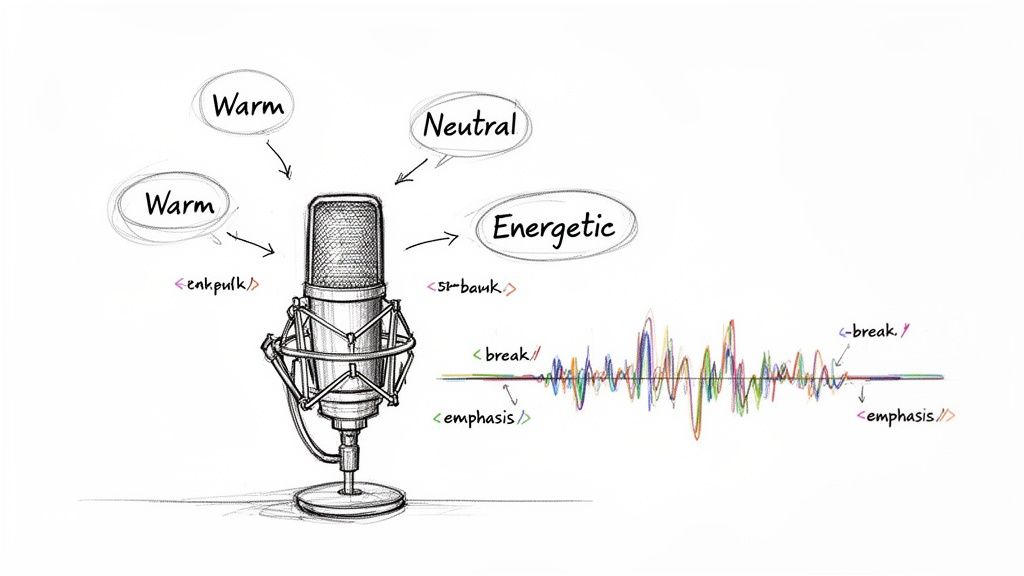
This level of control means you can find a voice that feels like a perfect extension of your brand and the book’s subject matter.
When you’re auditioning different voices, listen for these key traits:
Tone: Does your content need an authoritative, professional feel, or something more casual and friendly? A technical manual and a motivational guide demand very different voices.
Pacing: Some AI voices are quick and energetic, while others are slower and more deliberate. Match the pace to how complex your material is.
Accent: If you’re targeting a specific region, a familiar accent can create an instant connection and make the content easier to follow.
Many platforms offer different tiers of voice quality. Standard voices are decent, but the premium or neural voices are trained on much more advanced models, giving them a far greater emotional range and human-like inflection.
For a commercial audiobook, investing in a premium voice is almost always worth it. If you're looking for a top-tier solution, you might be interested in our deep dive on the capabilities of platforms like ElevenLabs.
Directing the Performance with SSML
Just picking a voice is only half the job. To really make your audiobook shine, you need to direct its performance using Speech Synthesis Markup Language (SSML). It’s a simple set of tags, a lot like HTML, that you pop right into your script to give the AI specific instructions.
Think of SSML as your director's notes. It's how you tell your AI actor when to pause for effect, which words to emphasize, and how to pronounce tricky terminology, transforming a monotonous reading into a dynamic performance.
With SSML, you get fine-tuned control over the narration.
First up is pausing. You can insert breaks for dramatic effect or to separate ideas. A simple <break time="1s"/> tag tells the AI to pause for one second, which makes the delivery feel much less rushed and more natural.
Next is emphasis. This is how you make a key point stand out. Wrapping a word in <emphasis level="strong">critical</emphasis> tags tells the AI to deliver that word with more force and conviction.
Finally, and maybe most importantly, is pronunciation. You can guarantee brand names, acronyms, or technical jargon are said correctly. The <phoneme> tag lets you spell out a word phonetically, ensuring perfect pronunciation every single time.
This is the kind of control that separates an average AI audiobook from a professional one. As AI narration gets more common—major players like Google Play Books and Apple Books are already experimenting with it—mastering these subtle direction techniques will give your final product a huge leg up.
Editing and Mastering Your Audiobook for a Professional Sound
The raw audio files you get from your Text-to-Speech (TTS) platform are a solid start, but they aren't the finished product. This is where the magic of post-production happens—the crucial step where you assemble, polish, and master your recording into something that sounds genuinely professional.
With just a bit of editing, you can elevate a decent AI narration into a fantastic one. The goal is to clean up the audio, give it a logical structure, and ensure a smooth, pleasant listening experience from start to finish.
Assembling Your Audiobook Structure
First things first, you need to bring all your generated audio files into an editor. You don't need to splurge on expensive software for this. A powerful and free tool like Audacity is more than capable of handling the job. If you're new to the software, our Audacity Masterclass is the perfect primer to get you up and running quickly.
Once you’ve loaded your files into the editor, your main tasks are pretty straightforward:
Chapter Management: Drag and drop your audio files into the correct sequence. If your TTS tool spat out one massive file, you'll want to slice it into logical chapters. This makes a world of difference for listeners trying to navigate your book.
Adding Intros and Outros: This is your opportunity to brand the audiobook. A short musical intro at the beginning and an outro with a call-to-action at the end instantly makes your project sound more polished and complete.
Pacing Adjustments: Listen closely for any spots where the AI's pacing just feels… off. You can manually trim out long, awkward silences or add brief pauses between paragraphs to improve the overall rhythm and flow.
Pro Tip: Keep your source files organized from day one. Create a dedicated folder for the raw audio, another for your music and sound effects, and a final one for the exported chapters. This simple habit will save you from massive headaches down the road.
Polishing the Audio for a Clean Sound
With the structure in place, it's time to zoom in on the audio quality. Even the best AI voices can have minor imperfections, and your job is to create a clean, distraction-free sound that lets the content shine.
The two most important tools in your arsenal here are noise reduction and volume normalization.
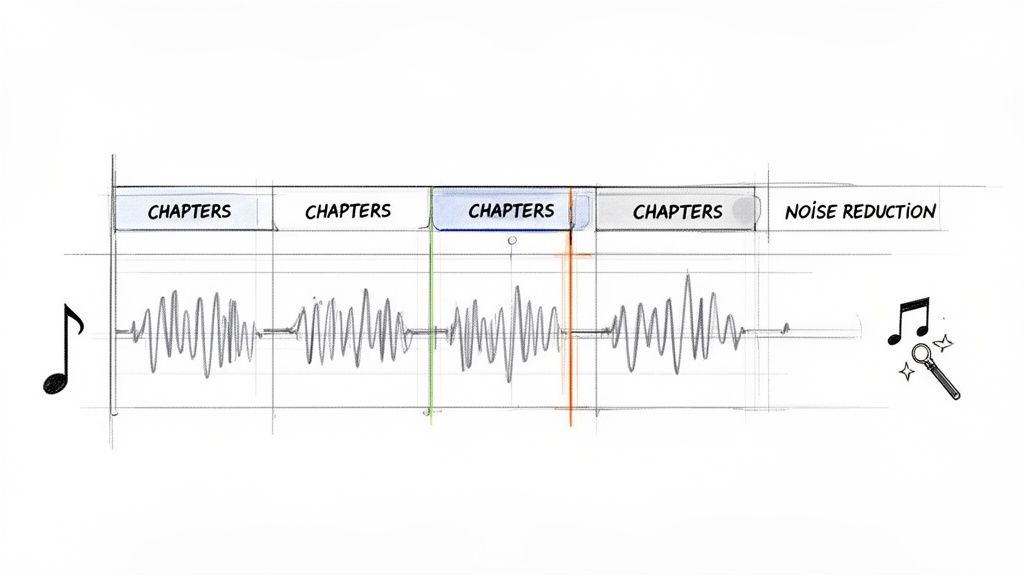
Noise Reduction is for zapping any subtle background hiss or digital artifacts that might have crept in during the generation process. Most editing software has a simple, one-click tool for this. Just be careful not to overdo it—applying too much can make the voice sound thin and artificial.
Normalization is the process of setting a consistent volume level across all your audio files. This is absolutely non-negotiable for a professional audiobook. It means your listeners won't have to constantly fiddle with their volume knob between chapters, creating that seamless, enjoyable experience you're aiming for. To really get this right, you'll need the right tools; you can find detailed reviews and comparisons of the best podcast editing software to help you choose wisely.
Finally, when you're happy with the sound, export each chapter as a separate MP3 file. Make sure you’re following the specs for your target platforms like Audible or Findaway Voices. They typically require a constant bit rate (CBR) of 192kbps and a sample rate of 44.1kHz.
You’ve done the hard work. Your audio files are polished, professional, and ready for listeners. Now comes the fun part: getting your audiobook out into the world and turning it into a real asset for your business.
What you do next depends entirely on your goals. Are you looking for direct sales? A powerful way to generate leads? Or maybe a tool to build a loyal community? Let's walk through the playbook for turning those audio files into tangible results.
Choosing Your Distribution Path
First things first, you need to decide how you'll get your audiobook onto all the major platforms. You essentially have two main roads you can take, and each comes with its own set of trade-offs.
Go Direct and Exclusive: You can go straight to a giant like Audible's Audiobook Creation Exchange (ACX). The upside? They often offer higher royalty rates if you agree to be exclusive. The catch is that you're locked into their ecosystem, meaning you can't sell your audiobook anywhere else.
Use an Aggregator for Wide Distribution: This is the path most creators take. Services like Findaway Voices (now part of Spotify) act as your distribution partner. You upload your audiobook just once, and they push it out to dozens of retailers—Audible, Apple Books, Google Play, libraries, you name it. Your royalty cut per sale is a bit smaller, but your potential reach is exponentially larger.
For most people, going wide is the smarter long-term strategy. It diversifies your income streams and ensures you aren't completely at the mercy of one platform's ever-changing rules and algorithms.
Choosing a distribution strategy isn't just about sales; it's about control. An aggregator gives you the flexibility to meet listeners on their preferred platforms, building your brand far beyond a single marketplace.
Monetization Beyond a Simple Sale
Just selling your audiobook is only scratching the surface of what's possible. For many creators and businesses, the real magic happens when you start using it as a strategic marketing tool. Thinking beyond the PDF-to-audio conversion opens up a whole new world of opportunities.
This multi-format approach isn't just a theory; it directly impacts your bottom line. Research shows that authors who release an audiobook alongside their ebook can earn up to 30% more lifetime revenue per title. Why? Because you're capturing both readers and listeners.
Here are a few creative ways to get more value from your audio content:
The Ultimate Lead Magnet: Forget the simple PDF download. Offer the first few chapters—or the entire audiobook—for free in exchange for an email signup. It’s a much more compelling offer and can do wonders for your conversion rates.
Create Premium Product Bundles: Don't just sell the audiobook. Package it with the original ebook, companion workbooks, or even a video course to create a high-ticket "deluxe" edition. This dramatically increases the perceived value, allowing you to charge a premium.
Launch a Private Podcast: Why not serialize your audiobook and release it as a private podcast? This is a fantastic perk for members of your community or clients in a coaching program. It adds continuous value and gives people a great reason to subscribe and stick around.
Once your audiobook is live, the final piece of the puzzle is promotion. Learning how to promote your book effectively ensures all your hard work gets the attention it deserves. When you think beyond simple retail sales, you transform your audiobook from a single product into a powerful engine for growth.
Common Questions About PDF to Audiobook Conversion
Even with a clear plan, you probably have a few questions rattling around before you jump in. That's smart. Let's tackle some of the most common concerns that pop up when turning a PDF into an audiobook.
How Long Does It Take to Create an Audiobook?
The timeline really boils down to your PDF's length and complexity. For a standard, text-heavy document around 100 pages, you can realistically get the whole project done—from text cleanup to final audio polish—in about 5-10 hours.
Honestly, the most time-consuming part is often the initial script prep. Cleaning up the text is where you'll spend the bulk of your effort. Generating the audio with a good AI tool? That part is surprisingly fast, often taking less than an hour. The final editing and mastering might take another two to four hours, depending on how comfortable you are with the software.
Is It Legal to Use AI Voices for Commercial Use?
Yes, it’s completely legal, but with one huge caveat: you must use a Text-to-Speech (TTS) service that provides the proper commercial licenses. This isn't something to guess on; you have to read the terms of service for whatever platform you choose.
Commercial Platforms: Services like Google Cloud TTS, Amazon Polly, or Murf.AI offer specific plans that grant you the rights to use their AI-generated audio in products you sell. They're built for this.
Free or Personal Tools: Stay away from free, non-commercial tools for any project you plan to monetize. Using them could land you in legal hot water down the road.
Will My AI-Narrated Audiobook Sound Robotic?
Not if you do it right. Modern AI voices have become incredibly human-like, especially the premium "neural" voices that are trained on sophisticated models. The key to avoiding that dreaded robotic sound is all in your preparation and direction.
Your best friends here are proper script cleanup and the strategic use of SSML (Speech Synthesis Markup Language). By adding simple SSML tags to control pauses, add emphasis, and fix pronunciations, you're essentially directing the AI narrator. It's how you get a much more expressive and natural-sounding performance.
The quality of your chosen TTS platform makes a massive difference. Investing in a premium service is the single best way to ensure your final audiobook sounds polished and professional, not robotic.
Can I Sell My AI Audiobook on Platforms Like Audible?
Yes, you absolutely can, but your distribution strategy matters here. While Audible's direct platform, ACX, has had some shifting policies on AI-narrated content, many creators are finding huge success by using distribution aggregators.
Services like Findaway Voices (now owned by Spotify) are a great option. They distribute to a massive network of retailers, including Audible, Apple Books, and Google Play. These platforms often have clearer and more established pathways for content created with modern AI tools. Just make sure to check the latest submission guidelines for your target platforms before you get started.